Container Orchestration: Kubernetes Architecture
What is Kubernetes? why do we call it K8s?
Kubernetes abbreviated as K8s (because there are 8 letters between "K" and "s" in "Kubernetes"), is an open-source container orchestration platform for automating the deployment, scaling, and management of containerized applications.
Kubernetes is a complex system that involves components like the API server, scheduler, controller manager, etcd (a distributed key-value store), and more. To interact with Kubernetes, you can use command-line tools like kubectl or various graphical interfaces and management platforms.
What are the benefits of using K8s?
Benefits of Kubernetes:
Container Orchestration: K8s manages the deployment, scaling, and scaling down of the containers within a cluster of machines. It ensures the desired number of containers are running and automatically replaces failed containers.
Automatic Load Balancing: K8s can distribute incoming traffic to different containers in a balanced manner which ensures efficient resource utilization.
Scaling: K8s can automatically scale up and scale down your application on the basis of load and defined rules.
Self Healing: K8s can detect and replace failed containers, which ensures that your application remains available.
Service Discovery: K8s provides DNS-based service discovery which enables containers to find each other using easy-to-remember names.
Storage Orchestration: K8s allows to mounting of the storage system to containers and it provides a mechanism to manage and attach storage to the container.
Configuration Management: K8s enables to define and manage the configuration and environment of the application through configuration files and environment variables.
Explain the architecture of Kubernetes.
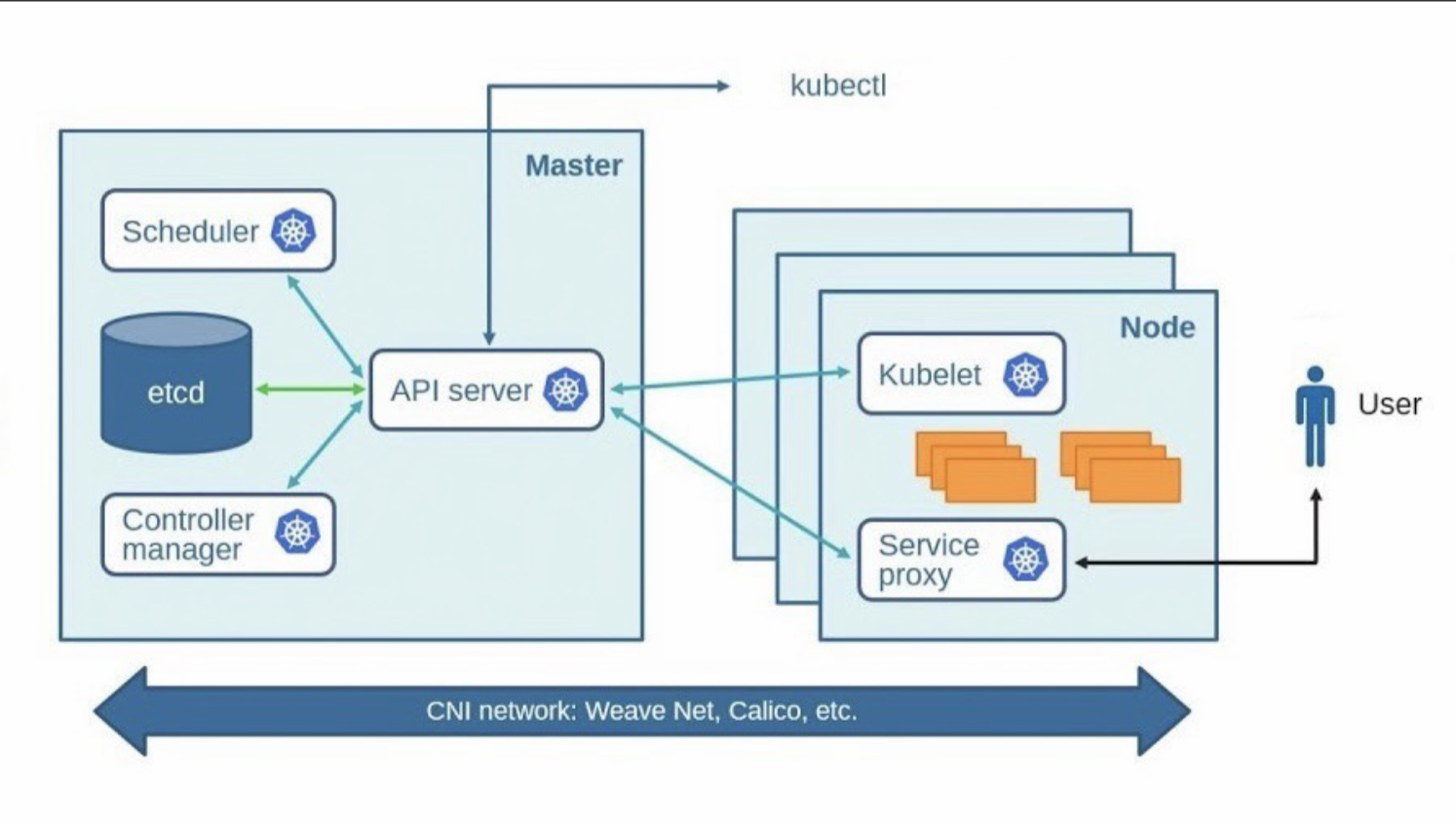
Working of k8s
We create a manifest (.yml) file.
Apply those to the cluster(master) to bring it into the desired state.
Pod runs on the node, which is controlled by the master.
The architecture of K8s:
Master: It refers to a server that gives jobs and manages the jobs assigned to be executed on the node server.
K8s cluster contains containers running on VM instances/cloud instances /all mix.
K8s designates one or more of these as master and others as workers/nodes.
The master is now going to run a set of K8s processes, and these processes will ensure the smooth functioning of the cluster, these processes are called 'control plane'.
API-Server: It is used for all the communications.
The API-Server interacts directly with the user(i.e. we apply .yml or .json manifest to API-Server).
The function of the API server is to scale automatically as per the load.
API-Server is the front end of the control plane.
etcd: It stores the metadata and status of the cluster.
etcd is a consistent and highly available store(key-value store).
etcd is a distributed key-value store that plays a critical role in Kubernetes as the primary datastore for all cluster data and configuration. It's used to store information about the state of the Kubernetes cluster, such as configuration settings, API objects, and metadata.
Recovery and Restoration: In the event of a cluster disruption or node failures, etcd's data can be used to restore the cluster state and configuration. Regular backups of etcd's data are crucial for disaster recovery.
Security and Authentication: etcd supports various security features, including TLS encryption for data in transit and authentication mechanisms for controlling access to the data store.
Consistency and Coordination: etcd provides strong consistency guarantees, ensuring that all nodes in the cluster see the same data at any given time.
API Server Interaction: The Kubernetes API server interacts with etcd to read and write data. When you create, update, or delete Kubernetes resources (like pods, services, or deployments), the API server communicates with etcd to store and retrieve the necessary data.
Scheduler:
When the user requests the creation and management of the pods, the scheduler is going to take action on that request.
Handles pod creation and management.
The scheduler assigns/matches any node to create and run the pods.
The scheduler discovers every new pod that doesn't have any node assigned to it. and take the responsibility to assign the most suitable node to the pod.
The scheduler gets the hardware configuration from the configuration files and then schedules pods on the node accordingly.
In Kubernetes, a scheduler is a process that is responsible for assigning Pods to nodes.
The scheduler takes into account the available resources on each node, as well as the requirements of each Pod, when making its decision.
The scheduler is implemented as a Kubernetes controller. Controllers are responsible for ensuring that the state of the system matches the desired state. In the case of the scheduler, the desired state is that each Pod is running on a node that has the resources it needs.
The scheduler uses a variety of factors to make its decision, including:
The resources required by the Pod
The available resources on each node
The Pod's affinity and anti-affinity rules
The Pod's scheduling policy
The Pod's affinity and anti-affinity rules specify how the Pod should be scheduled. For example, a Pod might have an affinity rule that specifies that it should be scheduled on a node that has a specific label. Or, a Pod might have an anti-affinity rule that specifies that it should not be scheduled on a node that has a specific label.
The Pod's scheduling policy specifies how the scheduler should prioritize Pods when making its decision. For example, a Pod might have a scheduling policy that specifies that it should be scheduled on the node with the most available resources. Or, a Pod might have a scheduling policy that specifies that it should be scheduled on the node with the least amount of traffic.
Controller manager:
Makes sure the actual state of the cluster meets the desired state.
It is responsible for ensuring that the state of the cluster matches the desired state. The controller manager does this by running a set of controllers, each of which is responsible for a specific aspect of the cluster state.
Node controller: For checking the cloud provider to determine if a node has been detected in the cloud after it stops responding.
Route controller: Responsible for setting up network, and routes on your cloud.
Service controller: Responsible for load balancers on your cloud against the services of type load balancers.
Volume controller: responsible for creating, managing, and mounting volumes and interacting with cloud providers to orchestrate volume.
Nodes(kubelet and container engine): It runs 3 important processes.
Kubelet: The agent running on the node.
Listens to k8s master (e.g pod creation request)
Use port 10255.
Send success/fail request to master.
Container engine: Works with kubelet
pulling images
Start/stop container
Exposing containers on ports specified on the manifest (.yaml file).
Kube-proxy: Assign IP to each pod.
- Kube-proxy runs on each node which makes sure that each pod has assigned a unique IP address.
4. What is a Control Plane?
The control plane is a critical component of Kubernetes. It ensures that the cluster is running correctly and that Pods are always running where they are supposed to be.
API server: The API server is the main entry point for interacting with the Kubernetes cluster. It exposes a RESTful API that can be used to create, manage, and delete resources in the cluster.
Scheduler: The scheduler is responsible for assigning Pods to nodes. It takes into account the available resources on each node, as well as the requirements of each Pod when making its decision.
Controller manager: The controller manager is responsible for ensuring that the state of the cluster matches the desired state. It does this by running a set of controllers, each of which is responsible for a specific aspect of the cluster state.
Etcd: Etcd is a distributed key-value store that is used to store the state of the cluster. It is used by the API server, scheduler, and controller manager to store information about the cluster, such as the list of Pods, the list of nodes, and the desired state of the cluster.
Write the difference between kubectl and kubelets.
kubectl: It is a command line tool used to interact with the k8s clusters.
It allows us to do a wide range of tasks:
Managing resources: We can use 'kubectl' to create update, delete, and view resources like pods, services, deployments, and config maps.
Inspecting clusters: We can use 'kubectl' to get information about the cluster nodes, namespaces, and configurations.
Scaling Applications: We can use 'kubectl' to change no. of replicas in deployments or replica sets which will enable application scaling.
Logging and debugging: We can retrieve logs of containers within pods and execute commands inside pods.
Applying configuration: We can apply cong=figuration files (.yaml or .json) using 'kubectl'.
Rolling update: We can perform rolling updates and rollback deployments using kubectl.
Authorization and Authentication: kubectl handles auth and authi to interact with the k8s clusters.
Here are a few basic
kubectlcommands:kubectl get pods: List all pods in the default namespace.kubectl get nodes: List all nodes in the cluster.kubectl describe pod <pod-name>: Get detailed information about a specific pod.kubectl create -f <yaml-file>: Create resources from a YAML file.kubectl apply -f <yaml-file>: Apply changes to resources defined in a YAML file.kubectl delete <resource-type> <resource-name>: Delete a specific resource.kubectl logs <pod-name>: Print the logs of a pod.kubectl exec -it <pod-name> -- /bin/bash: Open an interactive shell inside a pod.
kubelet: It communicates with the Kubernetes control plane, primarily the API server, to get its instructions and to report the state of the node and the pods it manages. The control plane makes decisions about where to place pods, schedules them onto nodes, and continuously monitors their health.
Here are some of the key responsibilities of the kubelet :
Node Health Monitoring:It reports the overall health of the node to the control plane and if a node becomes unhealthy, then the control plane can reschedule the affected pods to the healthy nodes.
Pod Lifecycle Management: The kubelet ensures that containers within pods are running and healthy. It starts and stops containers based on the pod's desired state.
Explain the role of API-server.
API-Server: It is used for all the communications.
The API-Server interacts directly with the user(i.e. we apply .yml or .json manifest to API-Server).
The function of the API server is to scale automatically as per the load.
API-Server is the front end of the control plane.
etcd: It stores the metadata and status of the cluster.
etcd is a consistent and highly available store(key-value store).
etcd is a distributed key-value store that plays a critical role in Kubernetes as the primary datastore for all cluster data and configuration. It's used to store information about the state of the Kubernetes cluster, such as configuration settings, API objects, and metadata.
Recovery and Restoration: In the event of a cluster disruption or node failures, etcd's data can be used to restore the cluster state and configuration. Regular backups of etcd's data are crucial for disaster recovery.
Security and Authentication: etcd supports various security features, including TLS encryption for data in transit and authentication mechanisms for controlling access to the data store.
Consistency and Coordination: etcd provides strong consistency guarantees, ensuring that all nodes in the cluster see the same data at any given time.
API Server Interaction: The Kubernetes API server interacts with etcd to read and write data. When you create, update, or delete Kubernetes resources (like pods, services, or deployments), the API server communicates with etcd to store and retrieve the necessary data.


